Khmer Editor រាប់ពាន់ កំណែពាក្យ
✔ កម្មវិធីជំនួយពិនិត្យអក្ខរាវិរុទ្ធ និងវេយ្យាករណ៍ខ្មែរលើ Microsoft Word & Excel សម្រាប់
✔ ស្វែងរកកាលបរិច្ឆេទ និងបញ្ចូលជាទម្រង់សូរិយគតិ ឬ/និង ចន្ទគិតិ!
✔ ស្វែងរកអត្ថន័យផ្ទាល់នៅលើកម្មវិធី៖វចនានុក្រមខ្មែរ (41,000 ពាក្យ) និងអង់គ្លេស (55,000 ពាក្យ)
✔ កែតម្រូវលេខកាត់ខ្ទង់មិនត្រឹមត្រូវ សរសេរលេខជាអក្សរ ស្គាល់ទាំងលេខសកល និងលេខខ្មែរ!

Khmer Editor PRO
កម្មវិធីជំនួយពិនិត្យអក្ខរាវិរុទ្ធ និងវេយ្យាករណ៍ខ្មែរ 🌙
Smart Scanning
Auto-check & Fast Scan
🗓 ជ្រើសរើសកាលបរិច្ឆេទ
(ចុច Right-Click លើថ្ងៃ ដើម្បីបញ្ចូលបរិច្ឆេទក្នុងអត្ថបទ)
អគុណ ➔ អរគុណ
វចនានុក្រម៖ ពាក្យ "អគុណ" ខ្វះអក្សរ "រ"។ ពាក្យត្រឹមត្រូវ គឺ "អរគុណ"
ញ៉ាំបាយ ➔ ញ៉ាំ បាយ
គួរដកឃ្លារវាងអក្សរឡាតាំង/លេខ និងអក្សរខ្មែរ
សូមអរគុណ ។ ➔ សូមអរគុណ។
លុបចោលការដកឃ្លានៅពីមុខសញ្ញាខណ្ឌ (Space before punctuation)។
សិទ្ឋិ ➔ សិទ្ធិ
ការសរសេរត្រឹមត្រូវគឺត្រូវប្រើជើង "ធ" មិនមែនជើង "ឋ" ទេ។
11/8/2026 ➔ ថ្ងៃទី១១ ខែសីហា ឆ្នាំ២០២៦
កាលបរិច្ឆេទនេះអាចប្តូរទៅជាទម្រង់ចន្ទគតិខ្មែរបាន
១១ សីហា ២០២៦ ➔ ថ្ងៃអង្គារ ៣កើត ខែស្រាពណ៍ ឆ្នាំមមី អដ្ឋស័ក ព.ស.២៥៧០ ត្រូវនឹងថ្ងៃទី១១ ខែសីហា ឆ្នាំ២០២៦
កាលបរិច្ឆេទនេះអាចប្តូរទៅជាទម្រង់ចន្ទគតិខ្មែរបាន
១ មករា ២០២៦ ➔ ថ្ងៃទី០១ ខែមករា ឆ្នាំ២០២៦
បំពេញទម្រង់កាលបរិច្ឆេទឲ្យបានពេញលេញ និងត្រឹមត្រូវ។
ឆ្នាំ២៦ ➔ ឆ្នាំ២០២៦
កែតម្រូវទម្រង់ឆ្នាំកាត់ ទៅជាទម្រង់ឆ្នាំពេញលេញ។
25000 ➔ ២៥,០០០ (ម្ភៃប្រាំពាន់រៀលគត់)
លេខអន្តរជាតិ ➔ ទៅជាលេខខ្មែរ + បន្ថែមអក្សរ
៨,១២៣០០០ ➔ 8,123,000 (ប្រាំបីលាន មួយរយម្ភៃបីពាន់រៀលគត់)
បំប្លែងលេខខ្មែរទៅជាលេខអន្តរជាតិ រៀបចំក្បៀស និងបន្ថែមការសរសេរជាអក្សរដោយស្វ័យប្រវត្តិ។
៤០ម៉ឺន ➔ 400,000
កែតម្រូវទម្រង់លេខចម្រុះ (Hybrid to Arabic)
1. ➔ ១.
បំប្លែងលេខរៀងអន្តរជាតិ (Lists) ទៅជាលេខខ្មែរដោយស្វ័យប្រវត្តិ។
✨ មុខងារសំខាន់ៗ (Core Features)
សុវត្ថិភាពទិន្នន័យ ១០០% ជាមួយនឹងជម្រើសប្រើប្រាស់បច្ចេកវិទ្យាពាក់កណ្តាល AI តាមតម្រូវការជាក់ស្តែងរបស់អ្នក។
កំណត់ទម្រង់បង្ហាញ និងពណ៌តាមចំណូលចិត្ត
(Dynamic Customization)
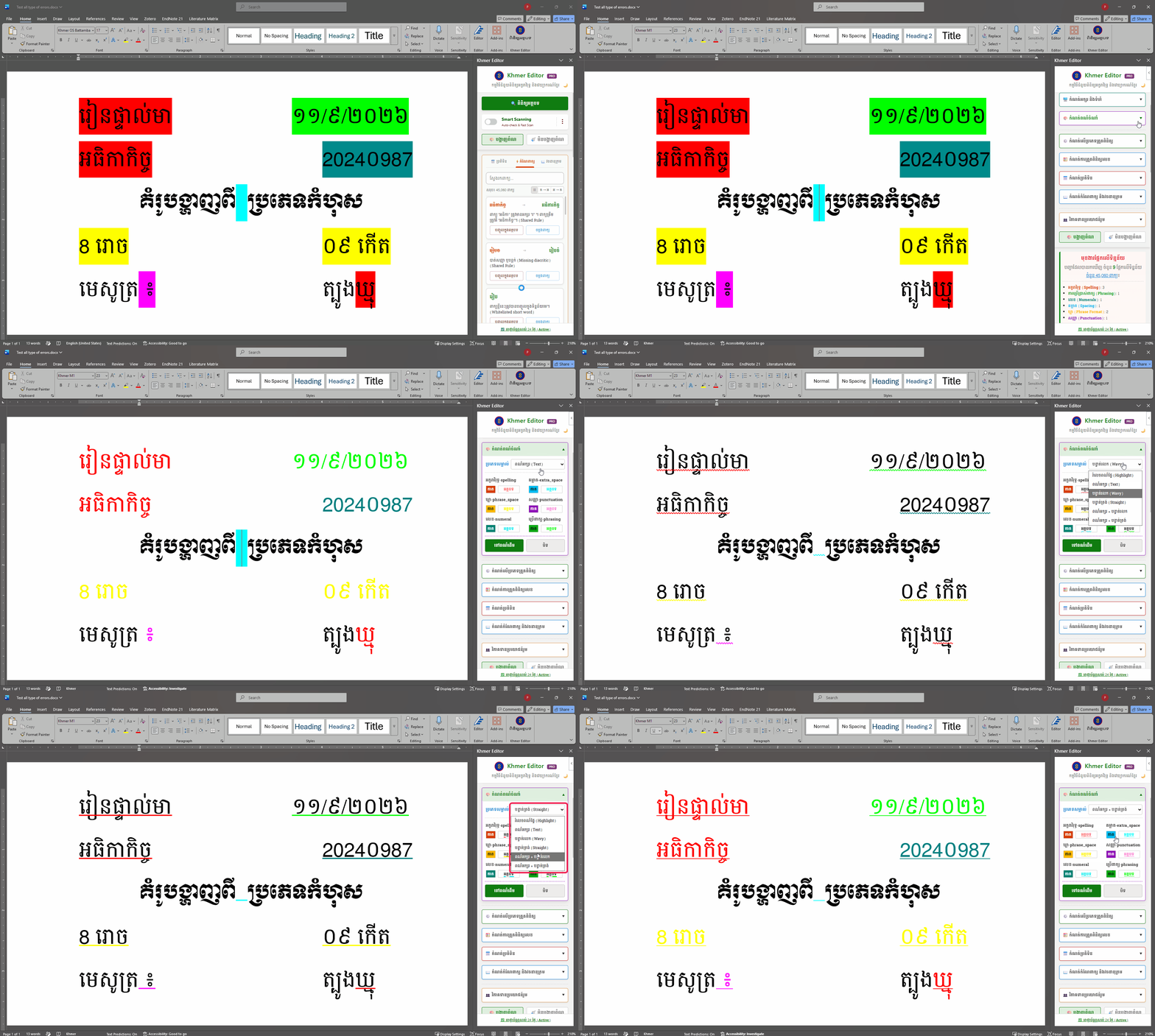
Khmer Editor អនុញ្ញាតឱ្យអ្នកផ្លាស់ប្តូររបៀបបង្ហាញ និងព៌ណកំហុសនៅលើ Ms. Word យ៉ាងងាយស្រួល ទៅតាមចំណូលចិត្តរបស់អ្នក៖
- ✔សម្គាល់ពណ៌ផ្ទៃ (Highlight)
- ✔ពណ៌អត្ថបទ (Text Color)
- ✔បន្ទាត់រលក (Wavy Underline)
- ✔បន្ទាត់ត្រង់ (Straight Underline)
- ✔ពណ៌អត្ថបទ + បន្ទាត់រលក
- ✔ពណ៌អត្ថបទ + បន្ទាត់ត្រង់
សុវត្ថិភាពទិន្នន័យ ១០០%
No text recorded anywhere, only your local PC
- ✔ពិនិត្យអក្ខរាវិរុទ្ធ, ឃ្លា (ព្យព្ជានៈខ្វះស្រះ ឬ មានតែស្រះ),
- ✔ពិនិត្យកំហុស ការដកឃ្លា និងការប្រើសញ្ញាមិនត្រឹមត្រូវ
- ✔ពិនិត្យកំហុស គម្តាត, ប្រើប្រាស់អក្សរកាត់
- ✔បច្ចេកវិទ្យាពាក់កណ្តាល AI៖ បើក ឬបិទ មុខងារ និង model AI (Gemini, DeepSeek ឬ Gemma)
ពហុមុខងារ ក្នុងកញ្ចប់តែមួយ
ALL-in-ONE on Ms. Words
- ✔មុខងារស្វែងរក កំណែពាក្យ សម្រាប់បញ្ចូលក្នុងអត្ថបទ ឬចម្លងពាក្យ (ទិន្នន័យចុងក្រោយ៖ រាប់ពាន់ ពាក្យ)
- ✔មុងារស្វែករក វចនានុក្រមខ្មែរ សម្រាប់បញ្ចូលក្នុងអត្ថបទ ឬចម្លងពាក្យ (ទិន្នន័យចុងក្រោយ៖ 41,000 ពាក្យ)
- ✔មុខងារស្វែងរក វចនានុក្រមអង់គ្លេស សម្រាប់បញ្ចូលក្នុងអត្ថបទ ឬចម្លងពាក្យ (ទិន្នន័យចុងក្រោយ៖ 55,000 ពាក្យ)
មុខងារស្កេនដោយដៃ និងស្វ័យប្រវត្តិ
Manual & Smart Scan
- ★មុខងារស្កេនដោយដៃ និងមុខងារស្វ័យប្រវត្តិ (Smart Scan) នៅពេលវាយអក្សរ ឬ Click លើអត្ថបទ៖
- ✔Replace (កែតម្រូវ)៖ ជំនួសពាក្យខុសទៅពាក្យត្រឹមត្រូវ
- ✔Skip (រំលង)៖ រំលងពាក្យណាមួយដែលមិនចង់កែប្រែ
- ✔Ignore (បំភ្លេច)៖ រំលងពាក្យណាមួយជារៀងរហូត
មុខងារបំប្លែង និងពិនិត្យលេខ
- ✔ពិនិត្យលេខ៖ កាត់ខ្ទង់មិនត្រឹមត្រូវ
- ✔ពិនិត្យលេខ៖ ប្តូរទៅលេខខ្មែរ ឬ បរទេស
- ✔ពិនិត្យលេខ៖ ខ្មែរ ឬ បរទេស និងសរសេរជាអក្សរ
- ✔ការបញ្ចូលដោយស្វ័យប្រវត្តិលើផ្នែកបញ្ចប់ លើការសរសេរលេខជាអក្សរ (រៀលគត់),(ដុល្លាគត់) ឬកំណត់ជាពាក្យផ្សេងតាមតម្រូវការ
មុខងារប្រតិទិន
- ✔ពិនិត្យកាលបរិច្ឆេទចន្ទគតិ និងសូរិយគិតិ
- ✔មុខងារស្វែងរក និងការបញ្ចូល ការលបរិច្ឆេទពេញលញ ឬ កាលបិរច្ឆេទសកល ឬចន្ទគតិខ្មែរ ដោយស្វ័យប្រវត្តិ
- ✔ការតាំងបង្ហាញថ្ងៃឈប់សាធារណៈ និងសម្គាល់ថ្ងៃសីល យ៉ាងសុក្រឹត
មុខងារបញ្ចូលពាក្យ
- ★ ចង់ក្រងកំណែពាក្យ តាមការស្ម័គ្រចិត្ត របស់អ្នកប្រើប្រាស់៖
- ✔បញ្ចូលពាក្យខុស និងពាក្យត្រូវ សម្រាប់ប្រើប្រាស់ផ្ទាល់ខ្លួន
- ✔ការរួមចំណែកធ្វើកំណែពាក្យ (ដោយផ្ទាល់នៅលើកម្មវិធី) នឹងផ្តល់អត្ថប្រយោជន៍ដល់អ្នកប្រើប្រាស់ទូទៅ។ បច្ចុប្បន្នមានទិន្នន័យផ្តល់ជូនមាន ចំនួន រាប់ពាន់ ពាក្យ។
អបអរសាទរពិធីបុណ្យភ្ជុំបិណ្ឌ ជាមួយការបញ្ចុះតម្លៃ 30%!
ទិញកញ្ចប់របស់អ្នកក្នុងតម្លៃពិសេស មុនពេលផុតកំណត់។
កញ្ចប់សេវាកម្ម (Pricing Plans)
ជ្រើសរើសកញ្ចប់ដែលស័ក្តិសមបំផុតសម្រាប់អ្នក ដើម្បីបង្កើនផលិតភាព!
កញ្ចប់ Basic
(៤-៥ ទំព័រ)
(ស័ក្តិសមសម្រាប់សិស្ស និស្សិត)
កញ្ចប់ Professional
(២៤-២៥ ទំព័រ)
(ស័ក្តិសមសម្រាប់អាជីវកម្មបោះពុម្ពខ្នាតតូច)
Upgrade
កញ្ចប់ Professional
(គ្មានកំណត់ទំព័រ)
(ស័ក្តិសមសម្រាប់ស្ថាប័នរដ្ឋ អង្គការ និងអាជីវកម្ម)
KhmerFixer Tool
ឥតគិតថ្លៃ (Free)ជួសជុលបញ្ហាអក្សរខ្មែរតូច នៅលើ Telegram
ដោះស្រាយបញ្ហាទំហំអក្សរខ្មែរតូចមើលមិនច្បាស់នៅលើកម្មវិធីកុំព្យូទ័រដោយស្វ័យប្រវត្តិ។
- ✔ កែតម្រូវទំហំអក្សរ Telegram (គាំទ្រ Method 1 និង Method 2)
- ✔ ជួសជុលបញ្ហាអក្សរលើ Microsoft Office
- ✔ កែប្រែទំហំ Desktop Icon Font

 Khmer Font Manager
កម្មវិធីគ្រប់គ្រងពុម្ពអក្សរខ្មែរ
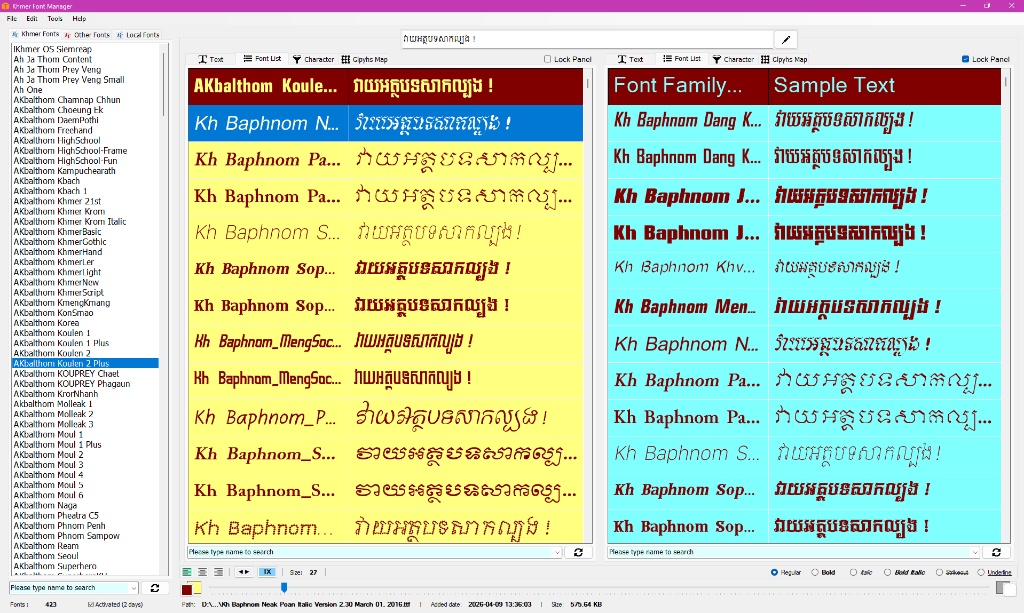
ងាយស្រួលក្នុងការប្រៀបធៀបម៉ូតអក្សរ និងស្វែងរកឈ្មោះពុម្ពអក្សរ តួអក្សរពិសេសៗ (Glyphs Map) សម្រាប់អ្នករចនាក្រាហ្វិក និងអ្នកវាយអត្ថបទ។
- ✔ ប្រមូលពុម្ពអក្សរខ្មែរដាក់ដោយឡែក ងាយស្រួលមើលតែម៉ូតអក្សរខ្មែរ។
- ✔ បង្ហាញជា ListBox (ឈ្មោះមួយៗ) និង ListView (បង្ហាញម៉ូតច្រើនក្នុងពេលតែមួយ)។
- ✔ មុខងារបង្ហាញ ១ ផ្ទាំង ឬ ២ ផ្ទាំង៖ ស្វែងរកឈ្មោះពុម្ព (Search) និងមុខងារតម្រៀបតាមអក្សរផ្តើម (Sort)។
- ✔ មុខងារ Copy និង Paste ឈ្មោះពុម្ពអក្សរ ដើម្បីសម្រួលការរចនាកម្មវិធីផ្សេងទៀតបានលឿន។
- ✔ មានមុខងាររក្សាទុកជារូបភាព និងមុខងារជាច្រើនផ្សេងទៀត។
កម្រងពុម្ពអក្សរខ្មែរ
ពុម្ពអក្សរខ្មែរ ដែលរចនាឡើងដោយ Khmer Editor
Font Name
Designed by Khmer Editor | Cheng Kimaun • TrueType Font (.ttf)
កិច្ចព្រមព្រៀងអាជ្ញាប័ណ្ណអ្នកប្រើប្រាស់ (EULA)
១. ការផ្តល់អាជ្ញាប័ណ្ណ (ការប្រើប្រាស់ផ្ទាល់ខ្លួន)៖ Khmer Editor ("អ្នកនិពន្ធ") ផ្តល់ជូនអ្នកនូវអាជ្ញាប័ណ្ណមិនផ្តាច់មុខ និងមិនអាចផ្ទេរបាន ដើម្បីប្រើប្រាស់កម្មវិធីហ្វុននេះសម្រាប់ការប្រើប្រាស់ផ្ទាល់ខ្លួន ការអប់រំ និងមិនមែនសម្រាប់គោលបំណងពាណិជ្ជកម្ម ដោយឥតគិតថ្លៃទាំងស្រុង។
២. ការប្រើប្រាស់ដោយឥតគិតថ្លៃដែលបានអនុញ្ញាត៖ អ្នកអាចប្រើប្រាស់ហ្វុននេះដោយសេរីនៅក្នុងឯកសារផ្ទាល់ខ្លួន កិច្ចការសាកលវិទ្យាល័យ គម្រោងសាលារៀន និងគណនីបណ្តាញសង្គមផ្ទាល់ខ្លួនដែលមិនស្វែងរកប្រាក់ចំណេញ។
៣. ការប្រើប្រាស់សម្រាប់អាជីវកម្ម (តម្រូវឱ្យមានអាជ្ញាប័ណ្ណ)៖ ការប្រើប្រាស់សម្រាប់អាជីវកម្មត្រូវបានហាមឃាត់យ៉ាងតឹងរ៉ឹងក្រោមអាជ្ញាប័ណ្ណឥតគិតថ្លៃនេះ។ ប្រសិនបើអ្នកមានបំណងប្រើប្រាស់ហ្វុននេះសម្រាប់សកម្មភាពស្វែងរកប្រាក់ចំណេញ—រួមបញ្ចូលប៉ុន្តែមិនកំណត់ត្រឹម ការផ្សាយពាណិជ្ជកម្មអាជីវកម្ម បដាផ្សព្វផ្សាយ វីដេអូរកលុយ (YouTube, TikTok, Facebook ជាដើម) ការធ្វើម៉ាកយីហោក្រុមហ៊ុន ឬទំនិញពាណិជ្ជកម្ម—អ្នកត្រូវតែទិញអាជ្ញាប័ណ្ណពាណិជ្ជកម្ម (Commercial License) ដើម្បីទទួលបានសិទ្ធិពេញលេញ។
៤. ការរឹតត្បិត៖ អ្នកមិនត្រូវបានអនុញ្ញាតឱ្យលក់ លក់បន្ត ឬចែកចាយកម្មវិធីហ្វុននេះជាផលិតផលឯករាជ្យ ឬជាឯកសារទាញយកឡើយ។ អ្នកមិនអាចកែប្រែ បម្លែងកូដត្រឡប់ ឬប្តូរឈ្មោះកម្មវិធីហ្វុននេះក្រោមឈ្មោះផ្សេងបានទេ។
៥. ការបដិសេធការទទួលខុសត្រូវ៖ កម្មវិធីហ្វុននេះត្រូវបានផ្តល់ជូន "ដូចដែលបានឃើញ (AS IS)" ដោយគ្មានការធានាណាមួយឡើយ។ អ្នកនិពន្ធនឹងមិនទទួលខុសត្រូវចំពោះការទាមទារ ការខូចខាត ឬបំណុលណាមួយដែលកើតចេញពីការប្រើប្រាស់ហ្វុននេះឡើយ។
ត្រូវការប្រើប្រាស់សម្រាប់អាជីវកម្ម?
ទទួលបានសិទ្ធិស្របច្បាប់ពេញលេញ សម្រាប់អាជីវកម្ម និងការផ្សព្វផ្សាយ។
ដោយទាញយក និងដំឡើងហ្វុននេះ មានន័យថាអ្នកយល់ព្រមតាមលក្ខខណ្ឌដែលបានបញ្ជាក់នៅក្នុងកិច្ចព្រមព្រៀងអាជ្ញាប័ណ្ណអ្នកប្រើប្រាស់នេះ។
ទាញយកកម្មវិធី Download
ដំឡើង Khmer Editor ជំនាន់ចុងក្រោយបំផុត ដើម្បីទទួលបានបទពិសោធន៍នៃការប្រើប្រាស់មុខងារថ្មីៗ។
Khmer Editor
v5.8.4សម្រាប់ Microsoft Word & Excel 365 / 2016+
File size: ~80 KB | Updated: August 2026
របៀបដំឡើងកម្មវិធី (Installation Guide)
អនុវត្តតាមជំហានងាយៗខាងក្រោម ដើម្បីចាប់ផ្តើមប្រើប្រាស់ Khmer Editor លើ Windows និង macOS។
Windows Installation
Download (.zip)
Click the download button to save KhmerEditor_wins.zip to your PC.
Run Batch Script
Extract the zip file and run install_khmer_editor_wins.bat to install automatically.
Launch in Word / Excel
Open Microsoft Word or Excel. On the Home tab, find Add-ins, click on My Add-ins (or See All or Advanced...), select Khmer Editor, and click OK. The taskpane will then appear on the right.
macOS Installation
Download & Extract
Download and extract KhmerEditor_mac.zip. Keep install_khmer_editor_mac.sh and manifest.xml in the same folder.
Run via Terminal
Open Terminal, type bash (with a space after), drag & drop install_khmer_editor_mac.sh into the Terminal, and press Enter.
Launch in Word / Excel
Restart Microsoft Word or Excel, and go to Insert > Add-ins > Developer Add-ins to find Khmer Editor!
វីដេអូណែនាំពីរបៀបដំឡើងសម្រាប់ប្រព័ន្ធទាំងពីរ (Video Guides)
Windows Setup Guide
Please use the real file name: install_khmer_editor_wins.bat
macOS Setup Guide (Sample Video)
Please use the real file name: install_khmer_editor_mac.sh
តម្រូវការប្រព័ន្ធ (System Requirements)
ប្រវត្តិកំណែរ (All Release Notes)
V. 5.8.4 (Edge Cache & Global Bandwidth Shield)
- New: Cloudflare Edge Caching: Successfully routed all database payloads through Vercel's Edge Network, allowing massive dictionary rules to freeze in the global CDN for instant, zero-latency loading.
- Fix: Bandwidth Optimization: Eradicated cache-busting timestamp queries from the fetch engine, permanently protecting the database from rate limits and dropping API reads to zero.
- Fix: KV Storage Architecture: Migrated environment variables to securely connect the frontend domain directly to the Upstash Redis shards without CORS blocks.
V. 5.8.3 (Self-Learning Whitelist & Lunar Precision)
- New: Self-Learning Whitelist (Auto-Typo Generator): Clicking 'Skip' (រំលង) on a valid word fragment silently extracts the full word, whitelists it locally, generates common spelling typos, and syncs them globally.
- Fix: Lunar Time-of-Day Drift: Applied Midnight Normalization to the Chhankitek engine to prevent the "Today" preview box from drifting into the next lunar day due to local time offsets.
- Fix: Toast Notification Layering: Forced absolute maximum z-index and 3D GPU translation to ensure popup notifications always render perfectly above glassmorphic sticky bars.
V. 5.8.2 (Cloud Shield, UI Alignment & Offline Preferences)
- New: Global Cloud Shield (Blacklist Protection): Added intelligent routing when ignoring words permanently. Valid dictionary rules are now ignored locally without polluting the global cloud blacklist, while only fragile AI/auto-generated typos are synced.
- New: Smart Network Detection & Offline Memory: The app now automatically switches to Offline mode if your internet connection drops, and restores when reconnected. The UI toggle dynamically adapts (Green for Online, Orange for Offline) and remembers your manual override preference.
- Update: Dynamic Action Toasts: Success notifications now dynamically mirror your custom button labels (e.g., 'បានបដិសេធពាក្យ...').
- Update: Refined Glassmorphism Badges: Softened the background opacity, border weights, and font boldness of the system status badges for a cleaner, native feel.
- Fix: Calendar Viewport & Centering Stabilization: Replaced volatile screen-size calculations with a strict CSS architecture (locked grid wrappers and min-heights). The calendar now flawlessly centers Buddhist/Holiday text and prevents UI fluttering or unwanted scrollbars across all monitor sizes.
- Fix: Optical Badge Centering & Layout Shift: Re-engineered the OFFLINE and tier badges using asymmetric padding and negative margins to prevent the app header from shifting horizontally.
- Fix: Card Action Button Alignment: Locked the dimensions and flexbox properties of the 'Confirm' button on error cards to prevent vertical stretching and text stranding.
V. 5.8.1 (Offline-First Architecture, Floating Modals & Dynamic UI Engine)
- New: Zero-Maintenance Offline Service Worker: Integrated an autonomous PWA Service Worker ('sw.js') with network-first fallback caching, enabling the entire Add-in UI and Office.js runtime to boot and operate completely without internet.
- New: Dedicated Local/Offline Mode Toggle: Added a quick-access option in the AI Settings to seamlessly disconnect from cloud APIs and force the scanning engine into a 100% offline Local Mode (ម៉ាស៊ីន), ensuring zero-latency, private, and cost-free editing.
- New: Independent Floating Settings Modal: Redesigned the settings screen into a standalone modal overlay complete with frosted-glass backdrop blur, pinned header controls, and event-delegated accordion handling.
- New: Floating Info Dashboard Modal: Detached the information box (Calendar, Corrections & Dictionary) into a globally accessible floating modal, allowing users to check dates, insert calendar info, or search definitions instantly without losing their scroll position while reviewing errors.
- New: Interactive Preview Swatches & Live Labels: Upgraded the highlight customization dashboard with real-time card color swatches, synchronized double-click label editing, and display style toggles.
- New: Systematic Auto-Typo Generator Engine: Integrated rule-generation logic prioritizing high-probability human typing errors (missing subscripts, diacritics, and endings) paired with length-boundary safety shields.
- Update: Host-Aware Responsive Heights: Implemented dynamic host detection (.excel-host) to automatically scale modal viewports seamlessly between Microsoft Word (646px) and Excel (606px).
- Update: Unified Close & Auto-Collapse Delegation: Built centralized event delegation across all internal 'បិទ' buttons to instantly dismiss modals and reset accordion menus back to their clean collapsed state.
- Update: Card Boundary & Gap Optimization: Refined .accordion-item spacing and overflow containment to preserve smooth rounded corners and consistent 15px card separation without visual clipping.
- Fix: Offline IndexedDB Engine Rehydration: Resolved offline rule compilation by rebuilding the globalDictionary scanner object directly from IndexedDB cached records during offline startup.
- Fix: Chromium Stacking & Layer Isolation: Cleared sticky toolbar z-index overlaps and focus trap conflicts on active scan layers during modal transitions.
V. 5.8.0 (Enterprise-Grade Aho-Corasick Engine & IndexedDB Migration)
- New: Aho-Corasick Hyper-Fast Search Trie: Replaced the traditional nested lookup loop with an advanced multi-string matching algorithm, allowing the engine to scan documents against 100,000+ rules in a fraction of a millisecond.
- New: IndexedDB Unlimited Local Caching: Migrated the heavy database caching system from browser localStorage to IndexedDB, completely eliminating the 5MB storage wall and preventing 'QuotaExceededError' crashes.
- New: Lazy-Load Engine Boot: The core scanner now arms completely on-demand upon the first scan, ensuring the Add-in opens instantly with zero UI freezing or startup lag.
- Update: Enterprise Scalability Architecture: Future-proofed the taskpane engine to effortlessly handle heavy multi-page documents scaling well past 550,000 characters without CPU bottlenecks.
- Fix: Memory Optimization: Streamlined global RAM utilization by decoupling background database loading routines from the critical typing path.
V. 5.7.9 (Grammar Engine Expansion & UI Polish)
- New: Advanced Grammar Engine: Deployed 5 new structural phrasing rules to instantly catch literal English translations (ធ្វើការ/មានការ), double pluralizations, time/space preposition errors, and double conjunctions.
- New: POS Inversion Restorer: Built a lightning-fast structural rule to detect English-style Adjective-Noun ordering (e.g., ថ្មីផលិតផល) and automatically swap them back to the proper Khmer Noun-Adjective format (ផលិតផលថ្មី).
- New: Interactive Live Preview Card: Added a fully-integrated skeleton preview card in settings that dynamically tracks active error categories and synchronizes left-border colors in real time.
- New: Customizable Action Buttons: Introduced dedicated color pickers allowing users to fully customize and save background colors for the action buttons (កែតម្រូវ, រំលង, រំលងរហូត).
- Update: Smart Loading States: Upgraded the Corrections and Dictionary tabs to seamlessly display «កំពុងទាញទិន្នន័យ...» (Fetching data) and «កំពុងផ្ទុក...» during the initial RAM sync, completely eliminating the '0 words' flicker.
- Update: Unified UI Architecture: Cemented the 'Less but Effective' design philosophy by ensuring all error cards—including complex phrasing suggestions—utilize the exact same, stable 3-button layout.
- Fix: Date & Spacing Card Color Sync: Resolved an issue where date and phrase-formatting rules failed to pass their specific custom color map, ensuring error cards now strictly match their category highlights.
V. 5.7.8 (Multi-Sharding, Chunked Payloads & UI Sync)
- New: Multi-Sharding Integration: Upgraded the backend routing engine to support parallel multi-shard check, allowing massive dictionaries and correction rules to load seamlessly without network bottlenecks.
- New: Chunked Payload Engine: Overhauled the JSON Bulk Importer and Cloud Backup systems to process and download data in safe batches, entirely bypassing server rate limits.
- New: Substring Shield for Identical Words: Deployed an advanced token-boundary check that permanently stops card desyncs when shorter typos are nested inside larger valid words.
- Update: Instant UI Synchronization: Live word counts and action buttons now update instantly via direct RAM injection and micro-delays, eliminating screen freezes during heavy JSON parsing.
- Update: Persistent Progress Toasts: Deployed anti-flicker notification banners that seamlessly track live progress during massive bulk uploads.
- Fix: Lunar Date Standardization: The numeral engine now automatically strips invalid leading zeros from Lunar dates (e.g., 09កើត ➔ ៩កើត) to strictly enforce official standards.
- Fix: Vanishing Highlight Fix: Eliminated the bug where cards would disappear during document interaction by mapping absolute global character coordinates.
V. 5.7.7 (Expanded Underline Styling & Race-Condition Immunity)
- New: "Expanded Visual Styling Options: Added complete support for all display modes, including Highlight (សម្គាល់ពណ៌ផ្ទៃ), Text color (ពណ៌អត្ថបទ), Wavy underline (បន្ទាត់រលក), Straight underline (បន្ទាត់ត្រង់), Text + Wavy underline (ពណ៌អត្ថបទ + បន្ទាត់រលក), and Text + Straight underline (ពណ៌អត្ថបទ + បន្ទាត់ត្រង់) options for comprehensive visual flexibility.
- New: Localized Action Labels: Replaced the core English action cards with clear, professional Khmer terms («កែតម្រូវ» for Replace, «រំលង» for Skip, and «រលងរហូត» for Permanent Ignore).
- New: Smart Tab Injection: The spacing engine now intelligently detects large alignment gaps (4+ spaces) and calculates proportional Tab formatting, preserving the document's layout while converting raw spaces into proper Word formatting.
- New: True Chronological Sorting: Upgraded the default dictionary and corrections sorting engine to natively order entries from newest to oldest using precision database timestamps.
- Update: Streamlined Dictionary Tooltips: Optimized hover definition tooltips to provide rich, immediate context without forcing accidental click redirections away from active error cards.
- Fix: Collision Immunity & Double-Check Prevention: Patched race-condition overlapping between the system punctuation engine and the compound word restorer, completely eliminating duplicate error cards and ghost highlights on a single target word.
- Fix: Persistent Underline Rendering: Restored dynamic underline and text color rendering loops for spacing and phrase format rules so custom styling profiles apply correctly across all error categories.
- Fix: Ghost Card Eradication (Spacing): Upgraded the core overlap shield to strictly quarantine multi-space anomalies. Large alignment gaps will no longer bypass the engine, permanently preventing duplicate or blank error cards from spawning.
- Fix: Invisible Space Rendering: Fixed an issue where spacing errors were invisible in 'Text Color' mode by forcing a distinct background highlight for gaps and spaces, ensuring total visibility.
V. 5.7.6 (Context-Aware NLP, Universal Shield & Live Summary)
- New: Dynamic Error Summary & Category Breakdown: Integrated an inline summary directly beneath the database stats banner that itemizes active errors by category, complete with live synchronized custom colors from user preferences.
- New: Real-Time Tally & Auto-Dismiss: The summary badge and category list dynamically decrement in real time as cards are replaced, skipped, or ignored, and automatically dismiss the summary box once all issues are resolved.
- New: Context-Aware NLP Engine: Introduced a self-learning Universal Dictionary Shield that evaluates adjacent text. If a flagged string is officially part of a valid compound word in the database (e.g., «ការសិក្សា»), the engine seamlessly protects it from being incorrectly highlighted as a typo.
- New: Smart Short-Word Whitelisting: The JSON bulk importer now intercepts root words of 3 characters or less (e.g., «ការ», «យល់») and securely injects them directly into the Universal Dictionary Shield without generating dangerous 2-letter false-positive typos.
- New: Smart AI-Sync & Collision Immunity: Novel corrections discovered by private AI tokens now automatically sync to the community cloud, while a real-time collision shield ensures the master database always overrides any conflicting auto-generated typo rules.
- Update: Maximum Match Priority: Upgraded the legacy string-matching loop into a high-speed context parser. The system now perfectly isolates and protects valid multi-word phrases natively using a lean, ultra-fast custom architecture.
- Fix: Universal Shielding Application: Removed artificial restrictions on the boundary shield. Manual correction rules are now subjected to the exact same rigorous contextual validation as auto-generated typos, ensuring flawless document integrity.
V. 5.7.5 (Instant Cloud Sync & Deep Purge Engine)
- New: Instant Cloud Sync: Manual and bulk JSON contributions now transmit directly to the cloud database in real-time upon submission, eliminating background sync delays.
- New: Dynamic Error Type Styling: The manual contribution dropdown now dynamically updates the selected item's text color in real-time to match its specific error classification category.
- Update: Deep Cloud Purge: The Admin Purge command now aggressively scans and wipes ghost typos directly from the global cloud memory, completely bypassing local-only restrictions.
- Update: Smart Cross-Referencing: Clicking a «ម.ព» (See Also) link within the Corrections tab now intelligently switches the active engine to the Dictionary tab and auto-searches the term.
- Fix: JSON Spacing Tolerance: The bulk importer now automatically strips accidental spaces from admin command strings to prevent authorization failures.
- Fix: Sync Optimization: Cleaned up redundant background upload loops to save bandwidth and prevent duplicate API payload requests during local saves.
V. 5.7.4 (Dynamic Search UI & Navigation Fixes)
- New: Interactive Definitions: Corrected words inside error card tooltips are now fully clickable, allowing you to instantly jump to the Dictionary tab to explore the full definition.
- Update: Dynamic Search Borders: The dictionary search box now dynamically shifts its focus border color to natively match the active language engine (Green for Khmer, Blue for English).
- Update: Smart Clear Button: The dictionary search 'X' button is now completely hidden by default, appearing seamlessly only when text is actively typed.
- Update: Pixel-Perfect UI: Realigned the dictionary results grid, header counts, and scrollbars to ensure perfectly centered, symmetrical layouts across all tabs.
- Fix: Cross-Reference Navigation: Resolved a rendering race condition where clicking a 'ម.ព' (See Also) link failed to properly open and search the dictionary if the dashboard was currently unpinned.
- Fix: Local Scope Searching: Normal clicks within the Corrections tab now strictly search within their own tab, preserving your context without accidentally jumping to the Dictionary.
V. 5.7.3 (Advanced Engine Priority & UI Polish)
- New: Smart Slider Linking: The Skip Shield and Boundary Shield configurations are now magnetically linked. Adjusting one slider automatically pushes the other to prevent conflicting or illogical scanning rules.
- Update: VIP Manual Priority: Overhauled the detection logic so that explicitly added manual rules are granted 'God Mode' priority and always highlight, while auto-generated database fragments strictly obey your slider limits.
- Update: Smart Dictionary Tooltips: Upgraded the hover definitions with a text-balancing algorithm that cleanly splits long definitions across multiple lines, now featuring the exact target word in the header.
- Update: Engine Default Tuning: Optimized the default Absolute Skip Shield (រំលងពាក្យ) limit from 3 to 4 characters, instantly providing a much cleaner scanning experience out-of-the-box.
- Fix: UI State Recovery: Fixed an interface glitch where executing a manual scan directly from the open settings panel would accidentally leave the main dashboard permanently hidden upon completion.
V. 5.7.2 (English Dictionary & Smart Detection)
- New: English Dictionary Integration: Introduced a comprehensive English dictionary database alongside the Khmer dictionary.
- New: Language Auto-Detection: The search box now automatically detects whether typed or pasted text contains English or Khmer characters, flipping the active dictionary engine seamlessly.
- Fix: Smart Boundary Shield: Optimized length-based boundary detection to strictly shield short words and auto-generated fragments (less than or equal to 5 characters) from causing false positives, while ensuring robust manual typos are flawlessly highlighted.
V. 5.7.1 (Interface Polish & Customization)
- New: Font Customization: Applied dynamic font handling and sizing support seamlessly across all menu headers and interface labels.
- New: Branding Shield: Locked core English elements, logos, and version tags permanently to Khmer OS Battambang for consistent typography.
- New: Refined Settings Layout: Reorganized the configuration menus into clean, visually grouped categories with balanced dividers and compact spacing.
- New: Dictionary Typography: Updated the dictionary entry header text color to a crisp, rich dark blue.
- New: Native Tooltips & Navigation: Integrated performance-friendly native browser tooltips across the app header, footer backgrounds, and status info.
- New: Dynamic Tooltips: Added interactive action tooltips («ចុចដើម្បីស្វែងរកពាក្យ... ចុចម្តងទៀតដើម្បីសម្អាត») to guide word lookups and cleanup.
- Fix: Excel Interface Sync: Restored full visibility of the 3-tab dashboard (Calendar, Corrections, Dictionary) in Excel and aligned the configuration menus to seamlessly match the newly reorganized layout while preserving active tab memory.
V. 5.7.0 (Smart Dictionary Definitions)
- New: Hover Definitions: Hover over corrected words in error cards to instantly see their official dictionary definition.
- New: Definition Replacement: Replaces the default error reason with the rich dictionary definition for recognized words.
- New: Dictionary Dashboard Pin: You can now pin the Corrections and Dictionary tabs to the top of the error list independently of the Calendar.
V. 5.6.0 (3-Layer Security Shield & True Time Sync)
- New: 3-Layer Anti-Tamper Security: Integrated an interdependent trial management system to prevent unauthorized resets.
- New: Stealth Hardware Fingerprinting: Generates a silent, privacy-safe Canvas/WebGL hash to reliably identify devices on the cloud even if the local cache is completely wiped.
- Update: True Time Sync (Anti-Time-Travel): The engine now fetches real-world global time directly from the server to calculate expirations, defeating local PC clock rollbacks.
- Update: Self-Healing Vaults: The Add-in automatically pulls the exact trial start date from the surviving layers and reinstates the locks.
V. 5.5.0 (Integrated Dictionary & Corrections Suite)
- New: Integrated Dictionary & Corrections Hub: Introduced dedicated, lightning-fast tabs for both វចនានុក្រម (Dictionary) and កំណែពាក្យ (Corrections) directly inside the add-on, allowing users to look up and inspect terms instantly without leaving their workspace.
- New: Direct Card Interactivity & Quick Search: Clicking any term card instantly triggers an inclusive search query, with a convenient toggle to clear and restore the full database list.
- New: Smart 'ម.ព' (See Also) Cross-Referencing: Automatically parses cross-reference terms within definitions into clickable links for effortless, multi-word navigation.
- Update: Unified Ultra-Slim Scrollbars: Harmonized inner and outer scrollbars to a sleek 4px width with fluid track alignment across both Light and Dark themes.
- Update: Stable UI Physics: Removed dynamic card bouncing transforms on hover to ensure absolute visual stability and eliminate layout shift.
V. 5.4.0 (Secure Cloud Infrastructure & UI Physics)
- New: Secure Cloud Infrastructure: Successfully merged the add-on and landing page repositories into a unified deployment.
- New: Interactive Taskpane Engine: Introduced a dynamic hover-state manager that seamlessly pauses auto-cycling when the user interacts with the taskpane.
- New: Admin Database Backup: Integrated a secure, hidden backdoor in the contribution form to instantly fetch the community dictionary JSON using a master admin key.
- Update: Advanced 'Curtain Pull' Physics: Re-engineered the auto-centering scroll using precise bounding client rectangles. Active cards now perfectly center themselves locally without accidentally causing the main application window to scroll.
- Update: Number-to-Text Generator: Upgraded the numeral detection engine to perfectly convert large Khmer numbers to international formats, automatically inject proper commas, and generate the exact written Khmer text (e.g., ៨,១២៣០០០ ➔ 8,123,000).
V. 5.3.0 (Smart Compound Word Restorer & Boundary Shield)
- New: Compound Word Restorer: Automatically detects accidental spaces inside valid compound words (e.g., កសិ ឧស្សាហកម្ម) and suggests merging them perfectly.
- Update: Dual-Direction Boundary Shield: The scanning engine now checks both the left and right sides of a word to permanently prevent short prefixes/suffixes from chopping valid compound words.
- Fix: Synchronized the Highlighting Engine with the Database Scanner to ensure 100% visual accuracy for boundary rules and multi-space word stitching.
- Fix: Resolved a 'Grapheme Desync' bug where partial word matches (e.g., finding 'កង' inside 'កង់') caused highlights to shift to the wrong words. The internal counter now perfectly respects Khmer vowels and diacritics.
V. 5.2.0 (Typo and bulk integration)
- New: Smart JSON Bulk Import: You can now paste a simple list of correct words (e.g., ["សួស្ដី"]) and the system will automatically generate all the common typo rules for you.
- Update: Lightweight Typo Generator: Automatically catches dropped final consonants, missing subscripts (ជើងអក្សរ), missing Bantok, and incomplete typing.
- Fix: Optimized rule generation to prevent Microsoft Word's internal search API from desyncing or freezing.
V. 5.1.0 (Currency & Calendar Updates)
- New: Inputting or selecting existing presets of currency suffix for a text-written-number (រៀល, រៀលគត់, ដុល្លារ, ដុល្លារគត់).
- Update: Bold public holidays, except Saturday and Sunday.
- Update: Handover color from Red to Black on the ordinary days, except holidays.
- Update: Auto close jump-to-date box after searching a date.
- Fix: Uncheck the buddhist holy day checkbox to not affect the calendar's holiday.
- Fix: Synchronize double-click on calendar to change header languages, number, and starting day.
- Fix: Double-click on calendar to change language, icon, number format, and starting day is working now even user check to pin calendar while there are error cards.
V. 5.0.0 (App Rebranding, Calendar and Excel Integration)
- New: Menu settings, ការត្រួតពិនិត្យលេខ and ការកំណត់ប្រតិទិន, are now available on Ms. Excel.
- New: Smart Scanning now is supported on Ms. Excel, working when user click on any cells.
- New: Expand Ms. Excel to support scanning/card error functions (Replace, Skip, Ignore).
- New: Double-click on any labels/header days of Calendar to loop language from/to khmer or English.
- New: Double-click on boxes of working day of Calendar to loop numbers from/to khmer or international numbers.
- New: Double-click on free-space of Calendar to change/loop starting day (Sun or Monday) of the week.
- New: Double-click on buddhist holy day to change icon.
- New: Public holiday added.
- Update: Add-in's version changed from 4 to 3 digits (e.g., older version of 4.0.0.9 updated to new version of 5.0.0).
- Update: App info added with Ms. Excel.
V. 4.0.0.9 (Calendar and Date Features)
- New: Now, Ms. Excel is supported to calendar functionality.
- New: New calendar feature, including Channkiti date.
- New: Jump to date feature.
- New: Date checking to/from Channkiti and/or Soriyakiti.
- New: Date/calendar integration and customization.
V. 4.0.0.8 (Grammar, punctuation and performance)
- New: Add bullet points/numbered points into error checking.
- New: Add រជ្ជុសញ្ញា into error checking.
- New: Color once time applied, outside loop.
- Update: Overall speed improvements, including highlight and unhighlight texts.
- Fix: Color setting apply correctly.
- Fix: Speed improvements in text processing.
- Fix: Ctl+Z undo functionality supports both Replace and Skip.
V. 4.0.0.7 (User expaerience and rules)
- New: New rules applied if user have typo double vowel or type without consonant.
- New: Free 14 days trial of Premium tier to new users.
- Update: Allow user to upgrade by click on license status, leading to activation form.
- Update: Tier basic can now scan up to 4-5 pages, Premuim up to 14-15 pages, and Pro. up to 24-25 pages and unlimited page for lifetime license.
- Fix: New rules applied for any khmer dates from System (not from users).
- Fix: selected specifc area/texts will skip above identical words, making speed faster.
V. 4.0.0.6 (Functionality and performance)
- New: Set new rules for និង and នឹង.
- New: Cache-Busting Manifest: Guarantees seamless and instant updates for users without manual cache clearing.
- Update: The 'Curtain Pull' Scroll: Buttery-smooth mathematical card centering without fighting Word's camera.
- Update: Live GPS Remapper: Flawless highlighting and card tracking even when document length changes dynamically.
- Fix: Smart Font Fallback: Protects Khmer text formatting from defaulting to Calibri/Arial after replacements.
- Fix: Smart Scan Shield: Strictly prevents background auto-scans from misfiring when the toggle is turned off.
V. 4.0.0.5 (Interface and performance)
- New: Allow user to change card color and highlight color.
- New: Auto-suggests connected rules (e.g., Question Marks) without manual re-scanning.
- New: Fixes spacing for Khmer-English-Khmer blocks in a single click.
- New: Number checking int. & Khmer: Correct format, convert to text and text to number...
- New: New pin buttons, adding Run and Back to Top button.
- Update: UI smoothly glides to the next logical card after replacing/skipping, eliminating camera jumps.
- Update: Zero-shake UI with scroll-lock and native focus synchronization.
- Update: Smart detection and recovery from document 'Undo' (Ctrl+Z) actions.
- Update: Setting's panel with collapsing and expanding features.
- Fix: Safely isolates Khmer numbers from letters to prevent accidental double-word deletion.
- Fix: Forces Word to remember user fonts, stopping commas from turning into Calibri/Arial.
- Fix: Fixed 'first card flash' bug so clicking document text feels instantly responsive.
V. 4.0.0.4 (Interface and performance)
- New: app-header click to scroll to the top, and app-footer click to go to bottom.
- Update: friendly transition on card selection and adptive shadow for light theme.
- Fix: More contrast shadow for dark theme.
V. 4.0.0.3 (Interface and performance)
- New: Apply up/down key as card selector; left/right key as text jumper.
- Fix: Show-color button to light color whem active in light theme.
- Fix: Restore card color when re-apply light theme.
V. 4.0.0.2 (Interface)
- New: Dark/light theme.
- New: AI Settings Panel (Use Private API Key).
- New: JSON Import Cheat Sheet (Color-coded syntax guide).
- New: Custom separator design.
- New: Protect random text to entry form.
- Update: Responsive Changelog UI with isolated scrollbar.
- Update: Maximum UI Squish (Tighter element margins).
- Fix: Eradicated Microsoft's hidden black focus borders.
- Fix: Reset alert message for manual form and json form.
- Fix: Clear text on active cards and set colors on error types.
V. 4.0.0.1 (Performance focused)
- New: Time Machine (30-Card Undo Restore).
- New: Smart Spacing Engine (Pac-Man logic).
- Update: Seamless UI (No camera jump on skip).
- Update: Global Watchdog (100% Undo detection).
- Fix: Batch Restoration perfectly re-sorts cards.
V. 3.0.0.0 - 4.0.0.0 (Smart Core Update)
- New: Live Database Word Count Syncing.
- New: Tier Limits (Basic, Premium, Pro).
- Update: Rate Limit (429/503) Fallback UI.
V. 2.0.0.9 (Foundations)
- New: Local & Community Dictionary Sync.
- New: JSON Bulk Import Logic.
- New: Hardware-locked Activation System.
- New: Voice Dictation Integration.
V. 1.0.9.5 - 2.0.0.8 (UI & Performance)
- New: Smart Scan Toggle (Auto-check vs Manual).
- New: 3D Flip Card Animation for Ignore UI.
- Update: Faster text highlighting using lightweight API calls.
V. 1.0.0.7 - 1.0.9.4 (AI Engine Core)
- New: Cloudflare Worker Integration for AI proxy.
- New: Multi-category error tags (Spelling, Spacing, Numerals).
- Update: ZWSP (Zero-Width Space) sanitation logic.
V. 1.0.0.0 - 1.0.0.6 (Initial Beta)
- New: Basic Khmer spelling detection.
- New: Word Add-in Taskpane UI created.
- New: Click-to-replace functionality.
កម្រងកំណែពាក្យ
ស្វែងរកការសរសេរត្រឹមត្រូវ និងកំហុសទូទៅ ដែលបានដកស្រង់ពីទិន្នន័យជាក់ស្តែង។
⏲ ពាក្យបន្ថែមថ្មីៗ កំពុងផ្ទុក...
Terms and Conditions
Last updated: August 28, 2026
Please read these terms and conditions carefully before using the Khmer Editor Add-on for Microsoft Word and Excel, and the associated website.
1. Software License and 14-Day Free Trial
Khmer Editor provides a fully functional 14-day free trial for new users to evaluate the software. Upon expiration of the trial period, continued access to the software requires the purchase of a valid subscription or a lifetime license. All purchases are final. Licenses are issued on a per-user basis and utilize a hardware-locked activation system tied to your specific computer.
2. Purchases and Payment Methods
We offer both recurring subscription plans and one-time lifetime purchases. We accept the following payment methods:
- Local Bank Transfers: ABA PayWay (KHQR)
- Digital Wallets: PayPal
- Credit/Debit Cards: Visa, Mastercard, AMEX (processed via secure 256-bit SSL checkout)
- Cryptocurrency: Bitcoin (BTC), USDT, and other supported networks
License keys are delivered digitally. Fiat currency transactions are typically processed instantly. Cryptocurrency payments require at least one blockchain network confirmation before the license key is officially dispatched.
3. User Contributions and Community Dictionary
Khmer Editor features a "Community Dictionary Sync." By actively submitting a word correction or new vocabulary item to our database, you grant us a non-exclusive, royalty-free license to distribute that specific language rule to other users. You agree not to submit sensitive, proprietary, or copyrighted sentences to the public database.
4. Third-Party AI Services
Khmer Editor includes optional "Semi-AI" features that allow you to integrate third-party AI models (e.g., Gemini, DeepSeek, Ollama). By utilizing these features, you agree to comply with the respective terms of service of those third-party AI providers. The Company is not responsible for the uptime, accuracy, or outputs generated by these external AI services.
5. Limitation of Liability
The Software is provided "AS IS" and "AS AVAILABLE", without warranty of any kind. To the maximum extent permitted by applicable law, in no event shall the Company or its suppliers be liable for any special, incidental, indirect, or consequential damages whatsoever (including, but not limited to, damages for loss of profits, loss of data, business interruption, or personal injury) arising out of the use of or inability to use the Software.
6. Contact Us
If you have any questions regarding your license or these Terms, please contact us:
- Telegram: @kimaun
- Phone: +85592669996
- Email: [email protected]
Privacy Policy
Last updated: August 28, 2026
This Privacy Policy describes our policies and procedures regarding the collection, use, and disclosure of your information when you use the Khmer Editor Add-on and Website.
1. Local Processing & 100% Data Security
Your privacy and document security are our absolute priorities. Khmer Editor processes your Microsoft Word and Excel documents locally on your computer. We do not read, record, transmit, or store the contents of your private documents on our servers. Your written text remains entirely on your local machine.
2. Information We Collect
While we do not collect your document contents, we do collect necessary operational data to provide our services:
- Activation & Licensing Data: To manage your 14-day free trial and enforce our hardware-locked licensing system, we collect basic device identifiers, operating system versions, and IP addresses.
- Community Dictionary Contributions: If you voluntarily use the feature to submit a new word or correction to our global database, we collect that specific isolated word or short phrase to improve the system for all users.
- Usage Analytics: We collect anonymous, aggregated statistics (such as total words checked globally) to monitor software performance.
3. Optional Semi-AI Features
If you choose to enable the optional Semi-AI technology, your specific text prompts will be securely routed through our proxy to your chosen AI provider (e.g., Gemini, DeepSeek). We do not log or store these prompts on our proxy servers. Please review the privacy policy of your chosen AI provider regarding how they handle prompt data.
4. Payment Information
We do not collect or store your full credit card numbers, bank account details, or cryptocurrency wallet private keys. All payment transactions are securely handled directly by our trusted third-party payment gateways (ABA Bank, PayPal, and our card processors).
5. Disclosure of Data
We do not sell or share your personal information with third-party marketers. We may only disclose your data if required to do so by law or in response to valid requests by public authorities.
6. Contact Us
If you have any questions or concerns about how we protect your privacy, please reach out to us:
- Telegram: @kimaun
- Phone: +85592669996
- Email: [email protected]
វីឌីអូ
ស្វែងយល់ពីរបៀបប្រើប្រាស់មុខងារនីមួយៗរបស់ Khmer Editor លម្អិត
